January 17th, 2026
Introducing Teams – Work Together, Create and Automate Faster! 🚀
We're thrilled to announce one of the most requested features: Teams is now live in Templated! 🎉
This is a big step forward for agencies, companies, and teams who want to collaborate on templates and share resources seamlessly.
✨ What's New
Shared Assets
All your templates, uploads, fonts, and renders now belong to your team.
Everyone on your team has access to the same resources. No more duplicating files or sharing credentials.
Invite Team Members
Invite colleagues to your team via email.
They'll receive an invitation link and can join your workspace instantly.
Role-Based Permissions
Assign roles to control what each team member can do:
Owner — Full access to billing, team settings, and all features
Developer — Can create templates, access the API, and manage renders
Designer — Can edit templates and upload assets (no API access)
Team Members Per Plan
Need more seats? Contact us and we'll work something out.
🚀 How to Get Started
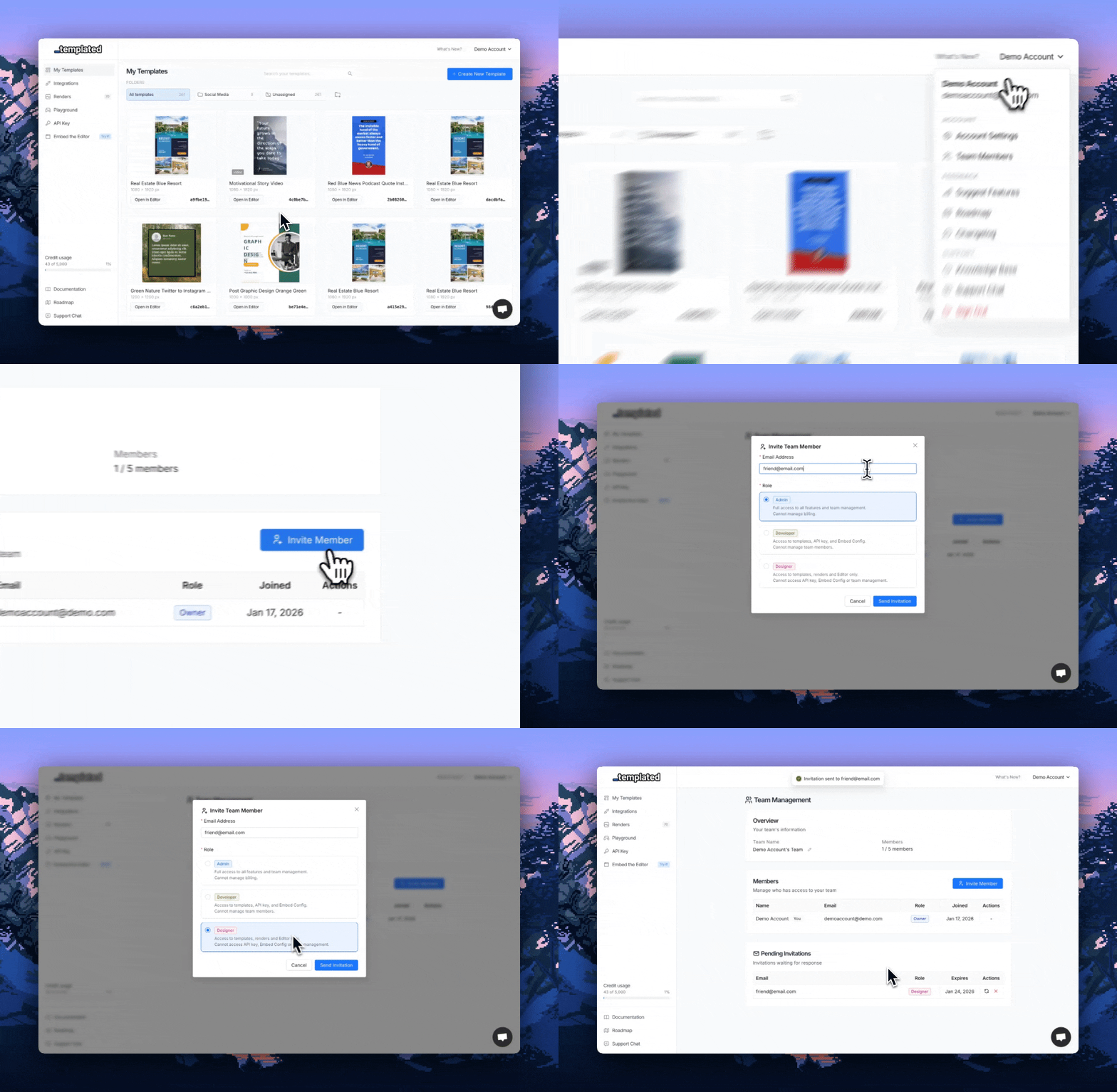
Go to Settings from the dropdown on the top right → Team Management
Click Invite Member
Enter your colleague's email and select their role
They'll receive an email invitation to join your team
Once accepted, they'll have access to all your team's templates and resources
💡 What This Means For You
Agencies: Manage client work with your team without sharing logins
Companies: Keep all design assets centralized and accessible
Developers: Grant designers access to edit templates while you focus on the API integration
Everyone: No more "can you send me that template?" messages 😅
🔒 Your Data is Safe
Existing users have been automatically migrated to the new team model. All your templates, uploads, and renders are exactly where you left them — now under your personal team.
That's it for this release!
We're really excited to see how you'll use Teams to collaborate.
As always, let us know if you have any feedback or suggestions.
Happy collaborating! 🎉
Pedro