Import your designs from Canva! 🎨
We're excited to announce a long awaited feature that makes it easier than ever to turn your Canva designs into dynamic, data-driven templates!
✨ What's New
Import from Canva is now available in Beta to all users! You can now import your existing Canva designs directly into Templated and transform them into powerful, automated templates.
🚀 How It Works
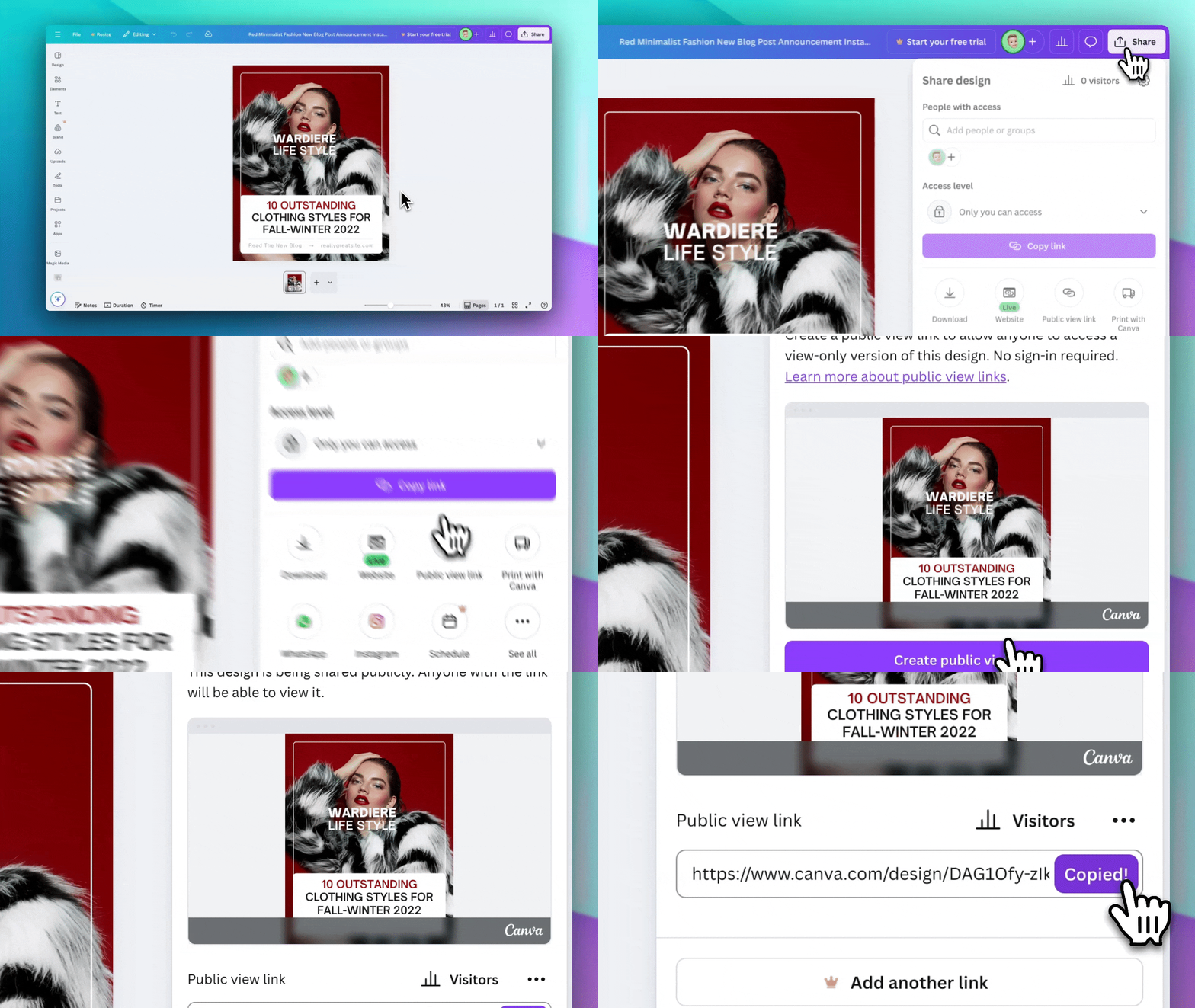
Open your design in Canva
Click the Share button in the top-right corner
Select Public view link from the dropdown
Copy the URL and paste it in the Import from Canva screen
Wait for the import to finish (~90 seconds)
Open the imported template in our Editor
Watch our quick demo video (above) in the import wizard to see exactly how to get your public view link from Canva!
💡 What Gets Imported
When you import a Canva design, we automatically convert:
Text layers (with fonts and styling)
Images and graphics
Shapes and vectors
Colors and backgrounds
Layout and positioning
Multi-page designs
The entire import process typically takes 60-90 seconds (depending on the number of pages and details in the design), and you'll see a live preview of your imported template before opening it in the editor and you can work on any adjusts and changes to the template after that.
This is still a Beta feature so please don’t expect that your design will be migrated with 100% accuracy, but we hope that helps you to quickly migrate, design and automate your assets.
Please let us know if any feedback or issues.
Until the text one,
Pedro